How to Perform a Standard Cross-listing of Your Courses
Instructors do have the ability to cross-list.
IMPORTANT: Cross-listing should be done while courses are unpublished. DO NOT cross-list after you have published your course and students have accessed it. Course work is retained within the course, not within the sections, so if a published course is cross-listed after publishing, all cross-listed enrollments will lose any associated assignment submissions and grades.
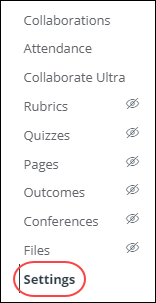
- Starting with the source course (the course you are cross-listing from) go to Course Settings
- Click the Sections tab.
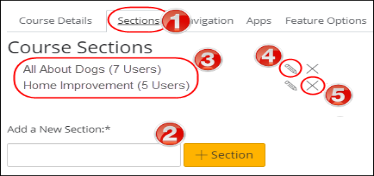
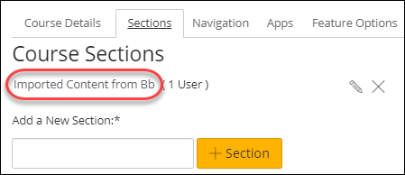
- Click the title of the section you want to cross-list (from).
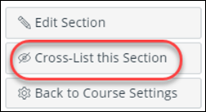
- On the right-hand side, click the Cross-List this Section button.
- In the Search for Course field [1], enter the name/title of the destination course (the course you are cross-listing into). Or, in the Course ID field [2], enter the ID number for the course you are cross-listing into.
NOTE: The ID number is found by going back to the destination course you are cross-listing into and getting the numbers that follow the final slash of the URL. (i.e. https://virginiacommonwealth.instructure.com/courses/416)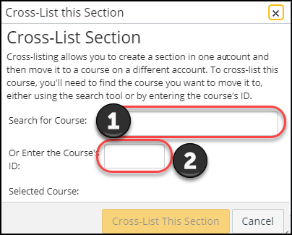
- Confirm you have selected the correct course [1]. Click the Cross-List This Section button [2].
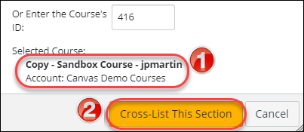
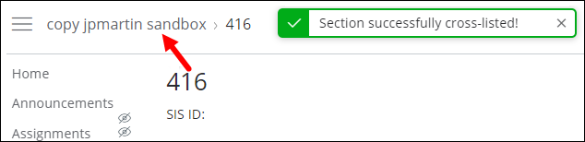
- The cross-listed section now appears in the new course, and the code is visible in the breadcrumbs.
Cross-Listing from Learning Systems Academy> in Kaltura
Residual Affects of Cross-Listing