Inactive Students in Canvas
*This behavior has been reduced following the implementation of Ellucian ILP. For more information please visit go.vcu.edu/canvas-ilp.
 You may notice a list of students on your Canvas "People" page marked as Inactive. Below you will find a list of frequently asked questions regarding this change.
When was this change made?
This system change was implemented in March 2022. The decision was made in partnership with the LMS Faculty and Stakeholder group. Additional information can be found on this page: User Statuses in Canvas.
What is the purpose of this change?
The overall purpose of leaving these students on the roster is to let the instructor know when someone who was once enrolled is no longer enrolled (i.e. withdrawn or transferred sections) or is waitlisted. In the case that a student withdraws at any time and there is a request for student activity within the course (i.e. submissions, grades), this information will be available for inactive students, which is an added benefit of this option.
How can I sort active student enrollments in Canvas?
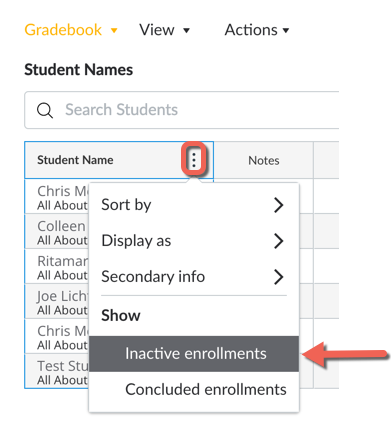
The gradebook allows you to filter the view of active and inactive students (see image below). For complete instructions, visit Filter Grades for Inactive and Concluded Students.
Can I sort active student enrollments on the People page in Canvas?
Unfortunately, in the “People” view of the roster, there is no functionality to hide inactive students. Visit the “How do I use the People page? for more information.
How does the course interact with inactive students?
A course does not interact with inactive students in any way. Inactive students are unable to access the course; this includes assignments, assessments, grades, etc. Additionally, messages sent from the course do not get sent to any student enrolled as inactive. The course is essentially non-existent to all inactive students.